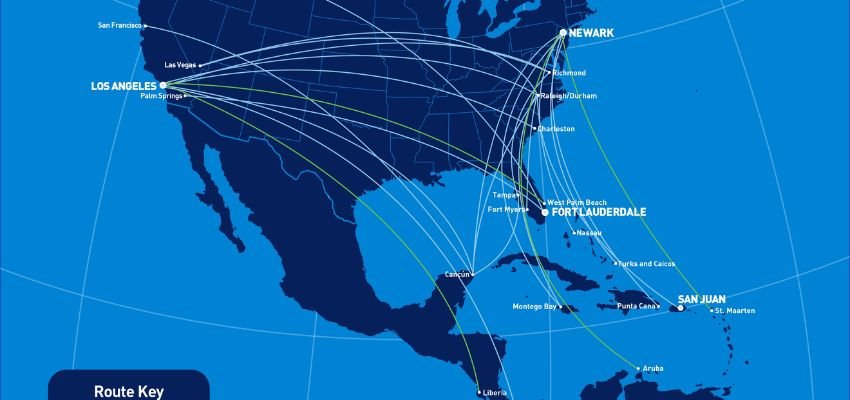
United Airlines is a renowned airline in the USA and operates an extensive domestic and international route throughout the United States and to locations on six continents. To enhance the traveller experience, the carrier provides “United in-flight Wi-Fi” on almost all of its mainline aircraft and on two of its regional aircraft. Passengers can use this service to browse the internet, send emails, and stay connected with family, friends, or colleagues while in the air. This guide provides complete details on United’s Wi-Fi, including its service providers, the types of connectivity available onboard, and how much you may (or may not) have to pay for it.
Wifi Access on United Flights
United Airlines provides reliable, high-speed internet on board via satellite-based in-flight Wi-Fi. There are two options for passengers to use in-flight Wi-Fi on United flights: free access and paid access.
Below is the detailed overview of both options:
- United Airlines offers free, limited in-flight Wi-Fi: Passengers can stay connected with family, friends, and colleagues. This variety of options helps you choose the option that best suits your needs, making your travel experience more comfortable. This free in-flight Wi-Fi option allows travellers to send regular text messages via WhatsApp, Facebook Messenger, and iMessage. However, it does not support video calls or sending photos.
- Paid United In-Flight Wi-Fi: United Airlines offers monthly and annual in-flight Wi-Fi subscription plans that can be used on any Wi-Fi-equipped aircraft. Subscription fees are based on the plan’s duration and the region of travel.
What is the Cost of United Airlines’ in-flight Wi-Fi?
The price you pay varies depending on the flight route, your United MileagePlus membership level, and other factors. Here’s an overview of United’s Wi-Fi price options:
- One-time fee: Passengers flying on domestic or short-haul international routes can enjoy in-flight Wi-Fi for $8 if they’re MileagePlus members, and $10 for non-members. For long-haul international flights, Wi-Fi costs vary by route.
- Day pass: United allows MileagePlus members to purchase a Wi-Fi day pass that covers their entire trip. You can add the pass when booking your flight or include it in your itinerary later.
The day pass becomes active one hour before your first flight of the day and is valid for 24 hours.
- Subscriptions: United Wi-Fi subscriptions let you pay for a month or a year of Wi-Fi usage in advance using your MileagePlus account. Prices begin at $49, or 7,500 miles per month.
- United credit cardholders: If you have a United co-branded credit card, you’ll get 25% back as a statement credit when you use it to pay for United Wi-Fi. This applies to annual and monthly subscriptions, as well as day pass purchases.
- T-Mobile customers: If you have a T-Mobile Magenta or Magenta MAX plan, you can enjoy free United Wi-Fi with streaming and unlimited texting. Magenta MAX customers get these benefits on all United flights with Wi-Fi.
Which United Airlines aircraft have Wi-Fi, and Who Provides It?
United has equipped almost all of its aircraft with WiFi connectivity and has four Wi-Fi providers throughout its fleet, such as:
| Wi- Fi Provider | Coverage | Aircraft |
| Thales | US Continental | 737-900ERSelect 757-300s737-700/800/900 |
| Panasonic | Worldwide coverage | Airbus 320767-300ER/400ERSelect Boeing 757-200/300Select Airbus 319777-200/200ER/300ER787-8/9/10 |
| Gogo | Mainland of the USA; Some parts of Alaska & Canada | Bombardier CRJ-700/550Embraer 170Embraer 175 |
| Viasat | US Continental, Canada, Mexico, Central America, Europe, and The Caribbean | Select Boeing 737-900sSelect Airbus 319sA321neo737 MAX 8/9 |
How To Connect To Wifi on a United Flight?
Below is the step-by-step procedure for connecting to the in-flight Wi-Fi on a United flight:
- First, turn on Airplane Mode, then enable Wi-Fi.
- Find and connect to ‘United WiFi’ from the list of available wifi networks.
- Open the browser on your device, and you will be automatically connected to the United Airlines Wi-Fi portal.
- If you encounter any problems, you can manually access the United Wi-Fi homepage at Unitedwifi.com.
Devices That Can Connect to United’s In-Flight WiFi
United Airlines in-flight Wi-Fi works like regular Wi-Fi, so you can easily connect your smartphones, tablets, and laptops. It supports Apple, BlackBerry, Android, Nokia, Kindle, and Windows devices. For the best experience, use one of these browsers:
- Internet Explorer 7+
- Google Chrome
- Firefox
- Safari
Final Thoughts
United Airlines offers Wi-Fi on a wide range of aircraft and routes, from short domestic flights to long-haul international journeys. It was the first U.S.-based carrier to introduce faster satellite-based Wi-Fi on its international flights, ensuring passengers stay connected even on long routes. Almost all United Airlines aircraft are equipped with Wi-Fi. Whether you are traveling for business or on vacation, “United in-flight Wi-Fi” keeps you entertained and connected with your loved ones even in the skies.
Frequently Asked Questions
Yes, you can use the free in-flight WiFi on United aircraft. However, only regular messages can be sent via WhatsApp, Facebook Messenger, or iMessage.
Almost all United aircraft are equipped with Wi-Fi. Passengers flying with the airlines can enjoy wi-fi access on even longer routes.
Yes, you can purchase a monthly or annual Wi-Fi subscription for any United Airlines aircraft using MileagePlus, except for flights equipped with Gogo Wi-Fi.
Wi-Fi costs $8 for MileagePlus members and $10 for non-members while traveling domestic or short-haul international routes. Alternatively, you can use 1,600 miles to access Wi-Fi.
You can purchase a United Wi-Fi day pass when you make your reservation. You can also select your trip from My Trips and see the Wi-Fi day pass option above your flight details.